The SentinelOne integration in Timus Manager allows you to retrieve real-time endpoint telemetry directly from your SentinelOne environment. This data is used to enhance Device Posture Checks, ensuring that only healthy, protected endpoints are granted access under your Zero Trust policies.
Once configured, Timus will use SentinelOne signals—such as malware detection, disk encryption, and agent status—to enforce continuous security and compliance validation.
What This Integration Enables
- Collect security telemetry from SentinelOne-managed endpoints
- Enforce Device Posture Checks using SentinelOne-sourced attributes
- Monitor agent installation, disk encryption status, and threat activity
- Use SentinelOne signals to strengthen access control policies in Timus
After successful configuration, SentinelOne will appear as a selectable Data Source in posture check policies.
Generate API Key in SentinelOne
- Sign in to your SentinelOne Management Console
- Click your user avatar in the top right
- Select My User
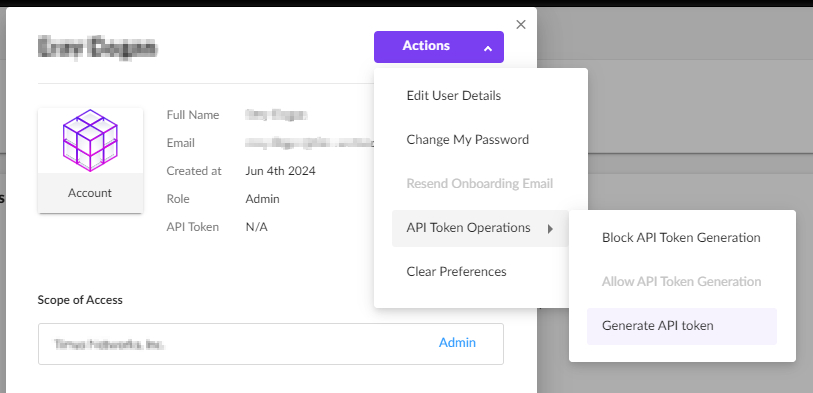
- Click Actions → API Token Operations → Generate API Key
⚠️SentinelOne API tokens are automatically renewed by our systems every 5 days.
Service User Role Requirements
Admin role
- Automatic API token renewal is supported.
- Tokens are renewed automatically every 5 days.
Viewer role
- Telemetry and data retrieval continue to function.
- Automatic API token renewal is not supported.
Tokens may expire and require manual regeneration.
⚠️Recommendation: To avoid manual API key maintenance and ensure uninterrupted telemetry, we strongly recommend creating the SentinelOne service user with an Admin role.
Confirm Your Management URL
Your Management URL is the base address used to access your SentinelOne console (e.g., https://yourcompany.sentinelone.net).
You’ll need to copy this value to connect Timus to the correct tenant.
Configure the Integration in Timus Manager
- Navigate to Settings → Integrations → SentinelOne → Manage
Enter the required details:
Field Description API Key Paste the token generated in SentinelOne Management URL Enter your console's base URL - Click Save
If the credentials are valid, SentinelOne will be activated as a data source and ready for use in posture policies.
Use SentinelOne in Device Posture Checks
Once enabled:
- Go to Zero Trust Security → Device Posture Checks
- Create or edit a posture check
- Add an attribute and select SentinelOne in the Data Source dropdown
- Choose from available SentinelOne attributes
Maintain the Integration
- Update the API Key every 30 days (manually)
- If the key expires, posture checks using SentinelOne data will fail
- Use the Integrations screen to update credentials at any time
🔐 Security & Data Handling
- API communication with SentinelOne is secured via HTTPS
- API keys are stored encrypted in Timus
- Timus has read-only access to your SentinelOne tenant
- No changes are made to devices, policies, or threat data in SentinelOne
- You may revoke access at any time from the SentinelOne console
Updated
Comments
0 comments
Please sign in to leave a comment.